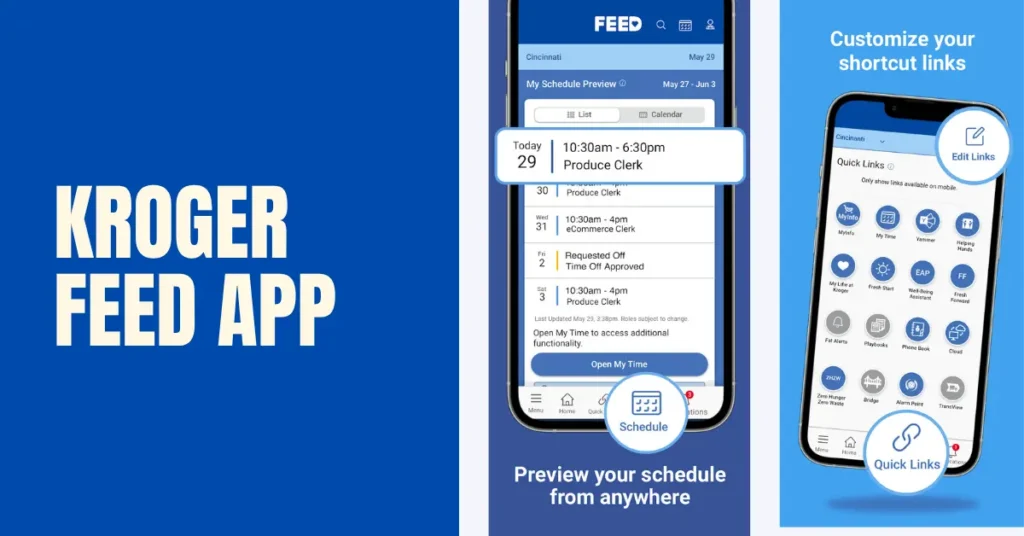
Whether you’re a new hire or a long-time associate, the Kroger FEED app (also called FEED Mobile) is one of the easiest ways to stay connected with work while you’re away from the store. It gives employees quick access to company news, workplace resources, and tools like MyTime, MyInfo, and other internal HR services – all from a single mobile app.
Designed for active Kroger associates, the FEED app lets you access important work-related information without signing in to multiple employee portals separately. You simply use your Enterprise User ID (EUID) and password – the same credentials used for Kroger employee systems such as MyTime and ESS – to securely access available services.
Here, you’ll learn how the Kroger FEED app login works, who can use the app, how to download, what features it offers, common login issues , and how it compares with MyInfo, MyTime, and the Kroger ESS portal.
What Is the Kroger FEED App?
The Kroger FEED app is Kroger’s official mobile communication and employee resource platform. It was created to give associates faster access to important workplace information without needing to visit multiple employee websites.
Instead of serving as a standalone payroll or scheduling system, the FEED app acts as a gateway to several internal Kroger services. Depending on your role and permissions, you may be able to access:
- Company announcements
- Employee news
- MyTime scheduling
- MyInfo employee records
- HR resources
- Benefits information
- Internal communications
- Work-related tools
For many associates, the FEED app becomes the primary starting point for accessing Kroger’s digital employee ecosystem.
Note: The exact features available may vary depending on your job role, division, and employment status.
Who Can Use the Kroger FEED App?
The FEED app is intended for authorized Kroger employees. Active associates with valid login credentials can typically sign in using their Enterprise User ID (EUID) and password.
Eligible users generally include:
- Full-time employees
- Part-time employees
- Store associates
- Pharmacy employees
- Distribution center employees
- Corporate associates
- Eligible management staff
If you’re a newly hired employee, your manager or HR department will usually provide the credentials and instructions needed to access Kroger’s employee systems.
Former employees may lose access to the FEED app after leaving the company. If you need employment records, tax documents, or payroll information after separation, you should contact Kroger Human Resources rather than relying on the app.
What You Need Before Logging In to the Kroger FEED App
Before attempting a Kroger FEED app login, make sure you have the following:
1. Enterprise User ID (EUID)
Your Enterprise User ID, often called your EUID, is your official Kroger employee username used across multiple company systems.
2. Employee Password
You’ll also need your current employee password associated with your Kroger account.
If you’ve recently changed your password, use the updated one when signing in.
3. Multi-Factor Authentication (If Required)
Some employees may be asked to complete an additional identity verification step using:
- Microsoft Authenticator
- Security verification code
- Company-approved authentication method
This extra layer of protection helps keep employee accounts secure.
4. Internet Connection
Because the FEED app connects to Kroger’s internal systems, you’ll need a stable internet connection using either Wi-Fi or mobile data.
How to Download the Kroger FEED App
Before you can use the Kroger employee app, you’ll first need to install it on your mobile device.
For Android Users
If you have an Android phone:
- Open the Google Play Store.
- Search for the official Kroger FEED app.
- Verify the publisher before installing.
- Download and install the application.
- Open the app and sign in using your employee credentials.
For iPhone Users
If you’re using an iPhone:
- Open the Apple App Store.
- Search for the official Kroger FEED application.
- Confirm you’re downloading the correct employee app.
- Install the app.
- Launch it and complete the login process.
Can You Use the FEED App on a Computer?
Yes. While the FEED app is designed primarily for mobile devices, many of the same employee resources can also be accessed through Kroger’s secure employee portals on a desktop or laptop computer.
Some tasks – such as viewing payroll information, updating employee records, or managing HR details – may redirect you to systems like MyInfo or ESS, depending on the feature you’re trying to access.
Why Do Employees Use the Kroger FEED App?
The biggest advantage of the FEED app is convenience.
Instead of remembering several different employee websites, associates can access many workplace resources from one central application.
Common reasons employees use the app include:
- Staying updated with company news
- Accessing employee resources
- Opening MyTime for scheduling
- Reaching MyInfo for personal information
- Finding HR-related resources
- Receiving important company announcements
- Accessing workplace communications while away from the store
This makes the FEED app one of the most frequently used digital tools for active Kroger associates.
How to Log In to the Kroger FEED App
Once you’ve installed the app and have your employee credentials ready, signing in only takes a few minutes.
Follow these steps to complete your Kroger FEED app login:
- Open the Kroger FEED app.
- Enter your Enterprise User ID (EUID).
- Type your employee password.
- Complete multi-factor authentication (if required).
- Tap Sign In.
- After successful authentication, you’ll be taken to your employee dashboard.
From there, you can access available employee tools, company resources, and connected systems based on your role and permissions.
If you’re logging in on a personal device for the first time, you may be asked to verify your identity before gaining access.
What Can You Do Inside the Kroger FEED App?
The FEED app is designed to make everyday employee tasks easier by bringing multiple workplace resources together in one place.
Depending on your position, you may have access to the following features.
View Company News and Announcements
The FEED app keeps associates informed about important company updates, policy changes, workplace announcements, and organizational news.
Instead of relying only on in-store communication, employees can stay updated directly from their mobile device.
Access MyTime for Work Schedules
One of the most commonly used features is quick access to MyTime.
Through the app, eligible employees can open MyTime to:
- View upcoming work schedules
- Check shift details
- Request time off (if available)
- Review attendance information
- Manage schedule-related activities
The FEED app itself doesn’t create schedules—it simply provides convenient access to MyTime.
Open MyInfo Employee Services
Employees can also access MyInfo, Kroger’s employee information portal.
From there, associates may be able to:
- Update personal information
- Review employment details
- Manage direct deposit
- Access payroll information
- Update tax documents
- Review benefits information
Again, the FEED app serves as a secure entry point rather than replacing MyInfo.
Access Employee Resources
The Kroger FEED app also provides access to various workplace resources, such as:
- HR information
- Employee policies
- Company documents
- Internal communications
- Training resources
- Workplace announcements
The exact resources available depend on your department and employee role.
Stay Connected While Away from Work
Many associates use the FEED app simply because it allows them to stay connected without needing to be inside the store.
Whether you’re checking tomorrow’s schedule or reading a company announcement, the app makes important information easier to access wherever you are.
Kroger FEED vs MyInfo vs MyTime vs ESS
Many employees get confused because Kroger has several different employee systems.
Here’s a simple comparison.
| Portal | Main Purpose | Best Used For |
| Kroger FEED App | Employee hub | Company news, employee resources, access to other portals |
| MyTime | Scheduling | Work schedule, shifts, attendance, time-off requests |
| MyInfo | Employee records | Personal information, payroll, direct deposit, tax forms |
| ESS (Employee Self-Service) | HR & payroll services | Pay stubs, W-2s, employee self-service functions |
Think of the FEED app as the front door that helps employees reach other Kroger systems.
Each platform has a different purpose, but together they support your day-to-day work experience.
Common Kroger FEED App Login Problems (How to Fix Them)
If you’re unable to sign in, don’t worry. Most login problems can be resolved with a few simple checks.
Incorrect Username or Password
This is the most common issue.
Double-check:
- Your Enterprise User ID (EUID)
- Password spelling
- Capital letters
- Extra spaces
If needed, reset your password using Kroger’s approved recovery process.
Forgot Your Password
If you’ve forgotten your password:
- Use the available password recovery option (if provided).
- Follow your company’s password reset instructions.
- Contact your manager or Kroger IT support if you’re unable to recover your account.
Multi-Factor Authentication Problems
If authentication codes aren’t working:
- Make sure your phone has internet access.
- Check that Microsoft Authenticator is working correctly.
- Verify you’re using the correct authentication method linked to your account.
App Isn’t Working
Sometimes the problem isn’t your account.
Try these steps:
- Close and reopen the app.
- Update to the latest version.
- Restart your phone.
- Clear the app cache (Android).
- Reinstall the application.
Server Maintenance
Occasionally, Kroger performs scheduled maintenance.
During these periods:
- Login may be temporarily unavailable.
- Some employee services may not load correctly.
- Access usually returns once maintenance is complete.
If everything appears correct on your end, waiting a short time before trying again often resolves the issue.
Is the Kroger FEED App Safe?
Yes. The official Kroger FEED app is designed with employee security in mind.
To help protect your account:
- Use a strong password.
- Never share your login credentials.
- Enable multi-factor authentication if available.
- Sign out when using a shared device.
- Keep your phone updated with the latest security patches.
Avoid downloading unofficial versions of the app from unknown websites. Always use trusted app stores or official Kroger resources.
Best Practices for Using the FEED App
To get the most from the app:
- Keep the app updated to the latest version.
- Review company announcements regularly.
- Check your schedule before each workweek.
- Update personal information promptly through MyInfo.
- Protect your login credentials.
- Report suspicious account activity immediately.
Following these simple habits helps ensure a smoother and more secure employee experience.
Frequently Asked Questions
What is the Kroger FEED app?
The Kroger FEED app is the official mobile employee app that gives eligible associates access to company news, employee resources, MyTime, MyInfo, and other work-related tools.
Who can use the Kroger FEED app?
The app is intended for authorized Kroger employees with valid Enterprise User ID (EUID) credentials and an active employee account.
How do I log in to the Kroger FEED app?
Open the app, enter your EUID and password, complete any required security verification, and sign in to access your employee dashboard.
Does the FEED app show my work schedule?
The app provides access to MyTime, where eligible employees can view schedules, shifts, and attendance information.
Can I check my pay stubs in the FEED app?
Payroll information is generally managed through MyInfo or other connected employee systems. The FEED app may provide access to those services depending on your account permissions.
Is the FEED app the same as MyTime?
No. The FEED app is an employee hub, while MyTime is specifically designed for scheduling, attendance, and time management.
Is the FEED app the same as MyInfo?
No. MyInfo focuses on employee records, payroll, direct deposit, and personal information. The FEED app simply provides access to MyInfo and other employee resources.
Why can’t I sign in to the FEED app?
Common reasons include incorrect login credentials, expired passwords, authentication issues, internet connectivity problems, or temporary system maintenance.
Final Thoughts
The Kroger FEED app makes it easier for employees to stay connected with the workplace by bringing important tools and resources together in one convenient mobile application. Whether you need to check company announcements, access MyTime for your schedule, or open MyInfo to manage payroll and personal information, the app serves as a central starting point for many everyday employee tasks.
If you’re an active Kroger associate, keeping the FEED app installed and updated can save time and simplify access to the systems you use most often. And if you’re ever unable to sign in, following the troubleshooting steps in this guide will help you resolve many common issues quickly.